How to avoid costly rework using wireframes?

A B2B startup I worked with last year had ten Figma files for a feature they hadn’t built yet. Beautiful screens. Real fonts. Branded buttons. Animated micro-interactions. The team was proud of the deck.
Three weeks into development, an engineer asked a simple question: “What happens if the user starts the flow on mobile and finishes on desktop?” Nobody had an answer. They had ten beautiful screens of a journey nobody had actually walked through.
Six more weeks went into rewiring the state management. Two of those screens got thrown out. One engineer left. The feature shipped a quarter late and adoption sat at 11%.
They didn’t have a design problem. They had a wireframe problem. They’d skipped the cheapest, ugliest, most important part of the build, and paid for it three layers deep in the codebase.
I spend a good chunk of my week telling founders that what they’re calling a “wireframe review” is actually a design preview. Those are different things, and the difference is usually a wasted sprint and a feature that doesn’t fit the product.
Here’s a simple way to think about it. It’s not a magic framework. It’s the same set of habits the best product teams run on instinct, written down so you can actually start doing them this week.
Why teams rush through wireframes
Wireframing feels slow. That’s the honest reason it gets skipped. The team has alignment on the feature, the founder is excited, the engineer is itching to write code, and the wireframe stage feels like a tax on momentum.
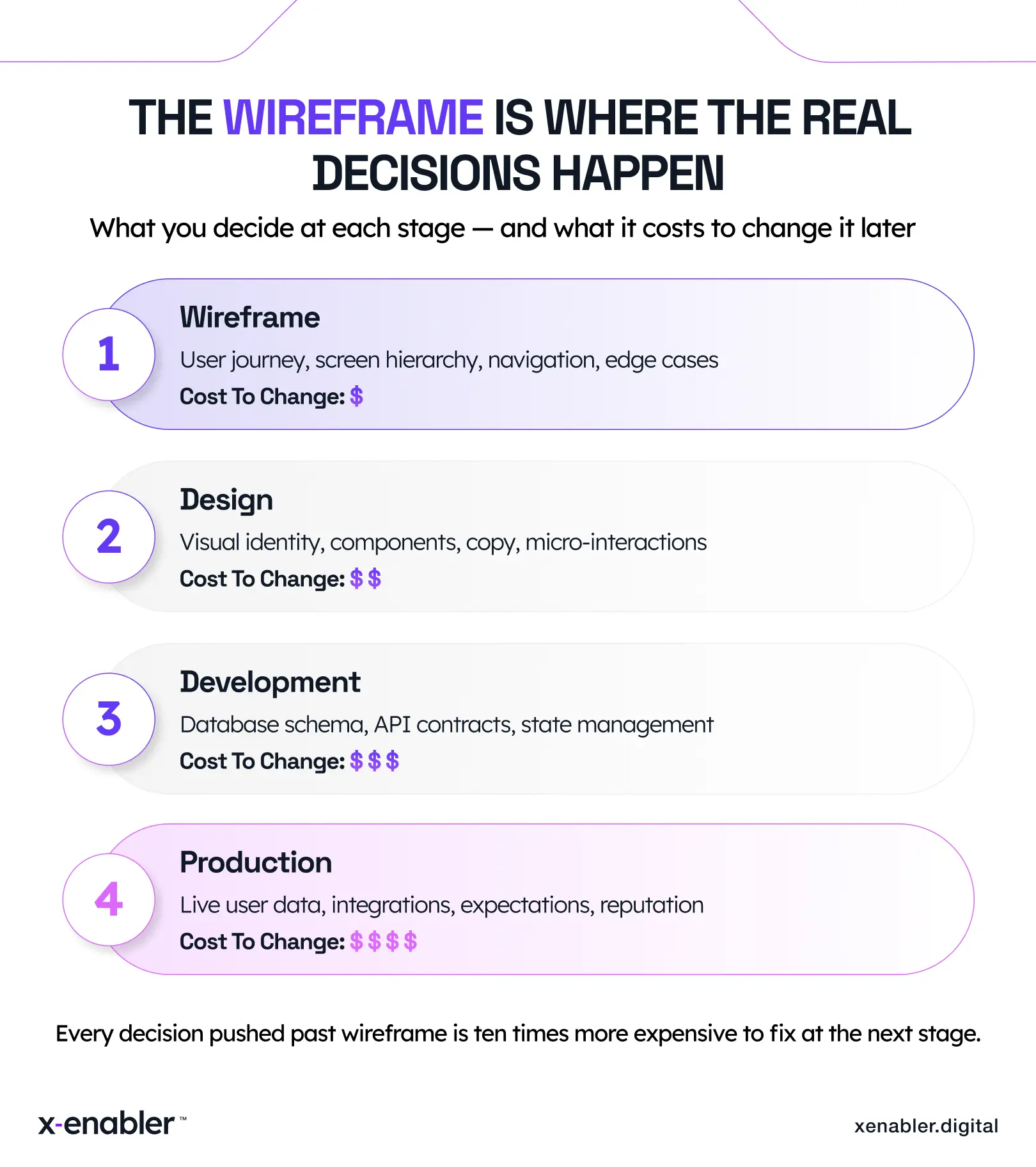
So someone opens Figma, drops in a colour palette, and starts laying out screens that look real. The team responds to how it looks instead of how it works. By the time anyone notices the navigation doesn’t make sense, the design system has shifted around it. The conversation becomes “move the button” instead of “rethink the journey.”
That’s the trap. High-fidelity mockups change the question being asked. You stop debating the structure and start debating the polish. And polish is the most expensive thing to fix later.
Five things only the wireframe stage can answer
When a team uses wireframes properly, five questions get resolved that nothing else in the build cycle can resolve cleanly. Skip any of them at this stage and you’re paying for the answer in code later.
1. Does the user journey hold together end to end?
Not the screen. The journey. What happens before they arrive, after they finish, when they fail halfway. Most product confusion lives in the transitions, not the destinations. A wireframe shows the whole flow on one wall. A high-fidelity mockup shows one room with the door closed.
2. Where does this feature live inside the app?
When Instagram launched Reels, the team faced a question that had nothing to do with how it should look and everything to do with where it should live. Should it sit in the main feed? Have its own tab? Interrupt Stories? Stay secondary?
That question gets answered at the wireframe stage, or it gets answered painfully, in production, after a backlash. Instagram gave Reels a dedicated tab, eventually replacing the Activity tab. Every trade-off behind it — visibility versus disruption, novelty versus familiarity — was a wireframe decision, not a development one.
3. What happens on the unhappy path?
The happy path is easy to wireframe. Everyone draws it first. The empty state, the error state, the offline state, the partial-data state — that’s where products earn user trust or lose it. Most teams remember these three weeks into development, when an engineer asks “what should this screen do when the API returns nothing?” That’s a wireframe-stage question being answered in a Slack thread.
4. Are product, design and engineering looking at the same picture?
The wireframe is the only artifact in the whole build cycle where all three disciplines argue over the same drawing. Product talks about the journey. Design talks about the hierarchy. Engineering talks about the data shape. If those three views don’t meet at the wireframe, they collide in code. And collisions in code cost weeks.
5. Is this even the right thing to build?
The lowest-cost place to discover the answer is “no”. Wireframes are the cheapest format for a user to look at and say “why would I do that?” If you can’t hand a clickable low-fidelity wireframe to five real users and watch them complete a task, you’re not ready to write a line of code. The feedback at this stage is the cheapest research you’ll ever buy.
The four wireframe mistakes I see most often
Across the teams we work with at x-enabler, the same patterns show up. None are technical. All are strategic
- Skipping straight to high-fidelity. Real fonts and real colours short-circuit the conversation. Low-fidelity first. Always.
- Wireframing in isolation. PM wireframes alone, hands to design, design hands to engineering, and engineering says “wait, this doesn’t work on the backend.” Three rounds later, you’ve burned two weeks on a meeting that needed ninety minutes.
- Wireframing without users. Wireframing without users. Wireframes built on assumptions become products built on assumptions. By the time you discover the assumption was wrong, you’re not fixing a wireframe — you’re fixing a codebase, a database, and a user expectation.
- Treating the first wireframe as the final one. The point of a wireframe is to be wrong cheaply. Good teams revise four or five times before anything reaches a developer. Average teams revise once and call it “good enough”. Good enough is the most expensive phrase in product development.
So what does this actually look like in practice?
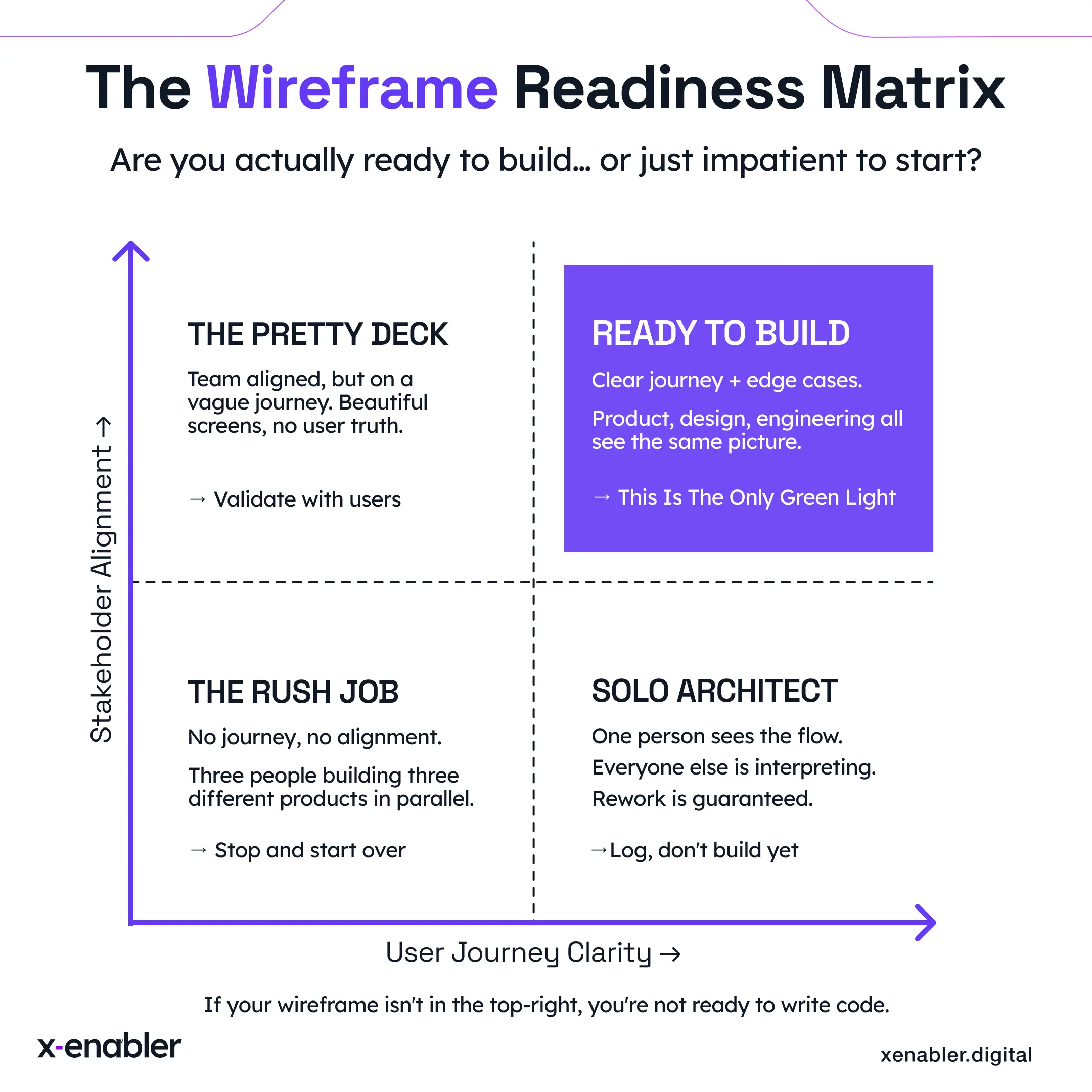
When we run a wireframe review with founders at x-enabler, we usually find one of three things in the first week:
- The wireframe is decorated, not designed. It looks polished but doesn’t answer the journey questions. (Most common. Start over at low-fidelity.)
- The wireframe is right and the team is aligned.(Rare. Ship it.)
- The wireframe is fine but built for the wrong user.(More common than founders want to admit. Go back to customer discovery before the next iteration.)
The third one is the outcome nobody wants but everyone needs. It’s also the cheapest one you’ll ever get, if you catch it before you’ve burned a quarter shipping the wrong feature beautifully.
The most expensive wireframe is the one that makes everyone in the room feel productive but doesn’t actually answer the question the product is asking.
Before your team starts building the next feature, ask one thing in the room: are we solving this in the wireframe, or are we paying to fix it in production later? If the honest answer is “we’ll figure it out as we go,” you already know what stage of the cost curve you’re on. The bill is coming.
A question I’d genuinely like to hear your answer to: when was the last time a wireframe decision saved your team from an expensive rebuild? Not a redesign. A real, would-have-broken-production decision. Reply, or send me a note. I read everything.
Interested in learning more about x-enabler?


Leave a comment!